

Curious how TeamOhana can help you? Talk to us.
In this article
Never miss new content
Finance approves 50 roles. Talent sees 30 open reqs. The HRIS shows 12 new hires nobody can tie back to the plan. Sound familiar?
That gap is what position control is supposed to close. And in most companies, it doesn't, because the approved plan lives in one place, requisitions live in another, and start dates live in a third.
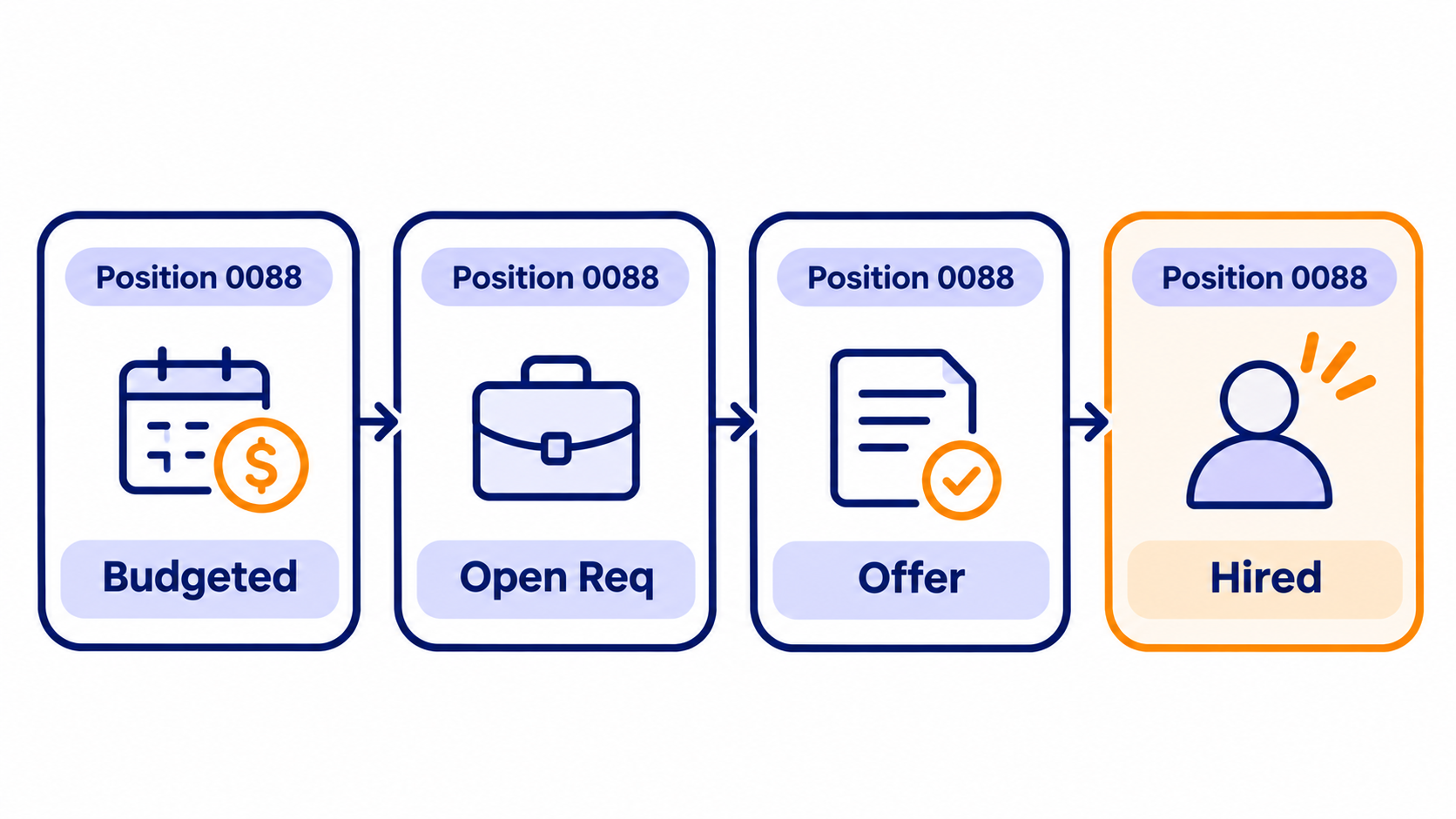
The quick answer: Budget to hire tracking is the practice of following every approved position through four checkpoints: budgeted position, requisition, offer, and start date. Each checkpoint has one owner, one ID, and one rule for what happens when it changes. When those four checkpoints are connected across your planning tool, ATS, and HRIS, Finance and Talent finally look at the same number.
This guide walks through how to set that up, from governance to metrics, so your headcount planning stops drifting the minute the budget is signed.
What is position control (and how is it different from budget to hire tracking)?
Position control is the governance layer. It decides which positions exist, who can approve them, and what happens when one changes. Budget to hire tracking is the operating rhythm on top of it. It follows each approved position until a real person is in the seat.
You need both. Position control without tracking gives you a clean approved plan that goes stale by February. Tracking without control gives you a beautiful dashboard of roles nobody actually approved.
Here's the distinction in practice:
| Position control | Budget to hire tracking | |
|---|---|---|
| Core question | Is this role approved and funded? | Where is this approved role right now? |
| Primary owner | Finance and People leadership | Talent, with Finance watching variance |
| Unit of work | The budgeted position | The position as it moves to requisition, offer, start |
| What breaks without it | Unbudgeted hires, rogue reqs | Stale forecasts, double counting, late surprises |
One more term worth untangling: a position and a requisition are not the same thing. A position is the approved, funded seat. A requisition is the recruiting job opened against it. Plenty of teams use the words interchangeably, and that's usually the first crack in budgeted position tracking. (New to the idea? Start with our plain-English guide to position management.)
What is budget to hire tracking? Budget to hire tracking follows every approved position through four checkpoints: budgeted position, requisition, offer, and start date. It lets Finance and Talent compare what was planned, what was offered, and what was actually hired.
Where budget to hire tracking breaks down
We talk to Finance, HR, and Talent leaders every week. Across dozens of conversations this year, the same five breaks keep showing up. (Details are anonymized. The pain is not.)
1. The approved plan is a spreadsheet, and it starts aging on day one. One People Ops leader described Finance handing over roughly 500 approved roles each fall as "the rawest of the raw." People partners add detail, TA ops re-keys it into the HRIS, and then Finance says some of those roles aren't approved anymore.
2. Two IDs, zero shared truth. Finance numbers its positions from the budget. The HRIS generates its own position ID. The ATS has a job ID. Recruiters end up hunting for the right ID before they can even start sourcing.
3. Positions pile up that should not exist. A finance leader at a post-growth company estimated about 2,000 positions in their HRIS when only around 800 should exist. Their reqs "theoretically should tie" to positions. In their words: "we're not even close."
4. Changes after approval get lost. An up-level from L5 to L6 needs re-approval. A counteroffer pushes comp up. A start date slips because of immigration timelines. Each change happens in a different system, and "it's so hard to understand where the approval is sitting."
5. Finance can't see real start dates, so the forecast is a guess. One finance team said they "just do a guesstimation" on target start dates, which throws off the forecast. Another adds 30 to 60 days to every past-due role at month end just to stay realistic.
The cost of all this is real. One company we spoke with discovered unapproved over-hiring in the double-digit millions in a single quarter.
That's not a recruiting problem. That's a position control problem.
The four checkpoints of budget to hire tracking
Every approved role should pass through the same four checkpoints, in the same order, carrying the same ID. Think of it as a chain of custody for headcount.
- Budgeted position. The role is approved and funded. It carries a planned title, level, department, budget compensation, and budget start date. This is your baseline, and it should never be overwritten. Everything later is measured against it.
- Requisition. The position is released to recruiting and a req opens in the ATS. The release is a deliberate gate, not an automatic one. A role approved in January for a Q3 start shouldn't open a req in January.
- Offer. A candidate gets an offer with real comp and a real start date. This is the first moment you can see whether the hire will land above or below budget.
- Start date. The new hire shows up in the HRIS and links back to the original position. Only now is the loop closed. Planned, offered, and actual can be compared line by line.
That release gate in step two matters more than most teams realize. SHRM's 2026 benchmarking puts median time to fill for nonexecutive roles at 39 calendar days, measured from requisition to offer acceptance. If a req opens months before the business needs the hire, your hiring pipeline tracking shows "behind plan" when nothing is actually wrong.
39 calendar days is the median time to fill for nonexecutive roles, from requisition to offer acceptance (SHRM, 2026 Recruiting Executives Benchmarking).
Here's what each checkpoint should capture:
| Checkpoint | Data captured | Source system | What it tells Finance |
|---|---|---|---|
| Budgeted position | Budget comp, budget start date, level, department | Headcount planning tool | What you planned to spend, and when |
| Requisition | Req ID, recruiter, target open date | ATS | Whether recruiting is on pace for the start date |
| Offer | Offer comp, offer start date, candidate | ATS | Comp variance before it hits payroll |
| Start date | Employee ID, actual comp, actual start | HRIS | True actuals for reconciliation |
When a position changes mid-flight, the rule is simple. Changes that touch budget go back through approval. Everything else just updates. A level bump or a comp increase above band is a budget change. A recruiter swap is not.
Governance: who owns what in position control
Good position control isn't more approvals. It's clearer ones. Every checkpoint gets a single owner and a written rule, so nobody has to ask "where is this sitting?" on Slack.
| Decision | Owner | Rule of thumb |
|---|---|---|
| Create a new position | Hiring manager requests, Finance approves | Mark it budgeted or incremental at submission |
| Release to recruiting | Business, FP&A, or Talent lead (pick one) | Release when the start date falls inside your time-to-fill window |
| Open the requisition | Talent / TA ops | No req without an approved, released position ID |
| Change level or comp | Hiring manager requests, Finance approves | Budget-impacting changes re-enter approval |
| Extend the offer | Recruiter, within band | Above band triggers Finance review |
| Confirm the start | People Ops | New HRIS record links to the original position ID |
| Close or archive | Finance and Talent, jointly | Review stale positions monthly |
Three governance rules make the biggest difference:
- One position ID, end to end. Pick one identifier and carry it from the budget into the ATS and the HRIS. If your HRIS generates its own, map them once. Don't make recruiters translate.
- Budgeted vs. incremental is decided at submission. An unplanned role should count as zero in the budget rollup, so the variance is visible immediately. No surprises in the quarter-end review.
- Decide who owns the release gate. In some companies it's the hiring manager. In others it's FP&A, when cash allows. In others it's the Talent lead, based on recruiter capacity. Any answer works. No answer doesn't.
This matters more than ever. Gartner's budget benchmarks show CFOs expect headcount growth to fall from 6% in 2025 to 2% in 2026. When every seat is scarce, recruitment budget management can't run on a spreadsheet someone updated last Tuesday.
Building a system-connected workflow
You don't need to rip out your HRIS or your ATS. You need them talking to each other through the position. Here's the setup that works:
- Your HRIS stays the system of record for people. New hires, terminations, transfers, and comp changes start there and flow out. Nothing should overwrite it.
- Your ATS stays the system of record for candidates. Sourcing, interviews, and offers happen there. Offer details should sync back to the position automatically, not by copy-paste.
- Your headcount planning layer is the system of record for positions. It holds the approved plan, routes approvals, controls the release gate, and reconciles all three.
With that split, data flows in one direction per job. The approved position pushes out to the ATS as a job and opening. Offer data flows back as soon as it's sent. The HRIS record flows in when the hire starts and links to the original position.
One line from a recent call sums up why this matters: if you "tell someone to make changes at three different places, they are not going to do it." A connected workflow means each person updates one system, and everyone else sees the change. No more Finance and HR reconciliation marathons at month end.
Two exceptions to plan for:
- Internal transfers. An internal hire won't auto-match a new HRIS record because the person already exists. Someone has to link them to the position on purpose.
- Declined or reneged offers. When an offer falls through, the position should move back to active recruiting, not stay "hired" and inflate your committed cost.
The metrics that matter for budget to hire tracking
If you only track one thing, track variance between budget and forecast. But the full picture takes six metrics:
| Metric | What it measures | Why Finance and Talent both care |
|---|---|---|
| Budget vs. forecast variance | Planned cost minus expected cost, by department | Shows overspend before it lands on the P&L |
| Date variance | Actual or forecast start vs. budgeted start | Late hires save money this year but delay the work |
| Comp variance | Offer or actual pay vs. budget comp | Flags above-band offers and level creep early |
| Non-budgeted hires | Roles marked incremental | Keeps unplanned growth visible, not buried |
| Positions by stage | Count at not started, released, in progress, offer, hired, filled | Pinpoints where the hiring pipeline is stuck |
| Unreconciled hires | Accepted offers with no linked HRIS record past start date | Prevents double counting in the forecast |
Two tips from the field. First, look at variance two ways: in-year impact and annualized. A hire that slips two months improves this year's number but costs the same over a full year. Second, the unreconciled hires number should be zero. Every week. If it isn't, your workforce planning forecast is counting someone twice.
And don't forget recruiter capacity. SHRM found requisitions per recruiter rose 67% at extra-large organizations in 2026. Releasing more positions than your team can work doesn't speed up hiring. It just makes the pipeline look worse.
How TeamOhana closes the loop from budget to hire
TeamOhana's Position Management is built for exactly this handoff. It sits alongside your HRIS and ATS, not on top of them, and turns every approved position into one record that follows the role from budget to start date.
Here's how each checkpoint works in TeamOhana:
- Budgeted position. Every request gets a unique headcount ID that never changes. Approval policies route it through the right chain, such as hiring manager, then Finance, then compensation. At submission, each role is marked budgeted or incremental, so unplanned hires show up as variance right away.
- Requisition. Approved roles wait at Not Started until someone flips Ready to Hire. That's your release gate. TeamOhana even recommends a target open date by working backward from the start date using your own historical time to fill. With a bidirectional ATS connection, recruiters can create or link the job and opening right from the position.
- Offer. Offer details sync back automatically when the offer is sent. Finance sees offer comp and start date next to the budget without anyone re-keying it.
- Start date. When the new hire appears in your HRIS, TeamOhana matches them to the position and the loop closes. Anything that doesn't match lands in Needs Attention for a quick manual link, so nothing gets double counted.
For Finance, the Variance Tracker compares budget against forecast and splits the difference into date variance, comp variance, and non-budgeted hires. Add a budget envelope and you can check each department's plan against its top-down number, too. For Talent, the Hiring Tracker and Recruiting Workboard show every approved position by stage. And with TeamOhana Computer, anyone with access can just ask, "How many approved engineering roles haven't been released to recruiting yet?" and get the answer from live data.
The result? One customer we spoke with summed up their biggest win as no more reconciliation and no cleanup, just one system matching the other. That's the whole point of position control.
See what connected headcount planning looks like for your finance team. Book a demo.
Patterns cited in this article are drawn from TeamOhana's recent conversations with Finance, HR, and Talent leaders. All references are anonymized and paraphrased.
Take control of your headcount spend

Position control FAQs
Simplifying TeamOhana: your questions, answered.
Position control is the governance layer for headcount. It decides which positions exist, who can approve them, and what happens when one changes after approval. Done well, it ties every requisition and every hire back to an approved, funded seat.
Budget to hire tracking follows every approved position through four checkpoints: budgeted position, requisition, offer, and start date. Each checkpoint has one owner and carries the same position ID. It lets Finance and Talent compare what was planned, what was offered, and what was actually hired.
A position is an approved, funded seat in the headcount plan. A requisition is the recruiting job opened in the ATS to fill that seat. One position can outlive several requisitions, for example when a candidate declines or a role is reopened.
Both, at different checkpoints. Finance owns approval and budget values, while People and Talent own the release to recruiting, the requisition, and the offer. A shared position ID and written rules for each checkpoint keep them aligned.
Connect your headcount planning tool to your ATS and HRIS. The approved position pushes to the ATS as a job and opening, offer data syncs back when it is sent, and the HRIS record links to the position when the hire starts. Each team updates one system, and everyone sees the same numbers.
Start with budget vs. forecast variance, then break it into date variance, comp variance, and non-budgeted hires. Add positions by stage and unreconciled hires to see where the hiring pipeline is stuck. Review variance both as in-year impact and annualized, since late hires lower this year's cost without changing the full-year cost.
Check unmatched hires and stuck offers weekly, since an accepted offer with no linked HRIS record double counts in the forecast. Review stale or abandoned positions monthly. Run a full budget vs. forecast review with Finance and Talent together each quarter.